Look for an app to manage a project and almost all of them offer the same thing: tasks, due dates, owners and columns going from “To do” to “Done”. It works brilliantly once you know what needs doing.
Thing is, plenty of projects spend weeks or months in an earlier phase, while they're still being thought through. You have notes, half-finished documents, conversations and quite a few doubts. There are no clear tasks because you haven't decided anything yet. And putting all that into a task board is like putting a draft into a spreadsheet: it fits, but what matters gets lost along the way.
This article is for that phase.
Two kinds of project
It's worth telling them apart, because they need different tools:
| Execution project | Exploration project | |
|---|---|---|
| The question | How do we get it out on time? | What exactly should we do? |
| Unit of work | A task | A piece: a note, a fact, a doubt, a decision |
| How it moves | By completing tasks | By clearing up doubts |
| What it needs | Dates, owners, statuses | Challenge, evidence and a memory of why |
| Main risk | Running late | Heading in the wrong direction |
Most project management apps are built for the left-hand column. If your project lives in the right-hand one, you'll find you always have too much structure and too little of something you can't quite put your finger on.
What a project you're still thinking about needs
- Notes connected by what they mean, not by the folder they're in. Where you saved a note matters less than what it supports or calls into question.
- A memory of decisions: what was decided, on what evidence and what would change your mind. Without it, every meeting starts from scratch.
- Separating facts from assumptions, so you don't build on something nobody has checked.
- Being able to test without breaking things, exploring another direction without dismantling the main one.
- Documents that come out of what you've thought. The summary or the specification should capture your reasoning, not make you think while filling in a template.
- Privacy by default. At this stage there are plenty of doubts you don't want to show yet.
Comparison by kind of tool
| Task manager (Trello, Asana) | Wiki or notes (Notion, Obsidian) | Whiteboard (Miro) | Noemori | |
|---|---|---|---|---|
| Best for | Executing and coordinating | Storing and documenting | Visual group thinking | Thinking an idea through to a decision |
| Basic unit | Task | Page or note | Sticky note or shape | Typed piece (question, evidence, decision, experiment, risk…) |
| Contradictions | Not applicable | You have to spot them | You have to spot them | The living layer points them out, citing your pieces |
| Why something was decided | Scattered comments | If you write it down | Lost when the board is cleared | Decisions, evidence and experiments linked together |
| Trying an alternative | Duplicate the board | Duplicate pages | Another area of the board | A TEST line you compare and merge |
| Documents | Attachments | You write them | You export the board | Drafted from your work, with citations |
| Does it push you to do more, or just enough? | More tasks | More pages | More space | Few active projects and a way to end the session |
They're all good tools at what they do. In fact, what works best for a lot of teams is combining them: one to think and decide, another to execute what's already been decided.
Fewer open projects, better thought through
Here's something no comparison mentions: the more projects you have open, the worse you think about each one. Even when you're not touching them, each one takes up a bit of headspace.
Cal Newport makes it the first principle of his book Slow Productivity (2024): do fewer things at once. His argument is that spreading your attention across too many fronts makes all of them turn out worse and slower.
In practice, it helps to:
- Set a limit on active projects, three for example. If a new one comes in, another one goes to rest.
- Put a project to rest with a good summary, rather than letting it slowly fade. It's much easier to pick back up that way.
- Keep ideas that don't belong to now on a list of possibilities, separate from your to-do list.
From reasoning to document, without copy and paste
In a project like this there comes a point where you have to explain it: to a partner, a client, your team or whoever is funding it. Usually that means opening a blank document and rebuilding from memory what you've spent weeks thinking about.
It works better the other way round. If what you've thought is already written down (questions, evidence, decisions, experiments), the document should come from there. At this stage, the ones used most are:
- The project brief: the problem, who it's for, what you know and what you don't.
- The decision memo: what was decided, on what evidence and when to revisit it.
- The experiment plan: what you'll test, how, and what result you'd call a success.
- The research synthesis: what you've learned from people and sources.
- The product specification, once it's time to build.
- The presentation outline, for telling it in ten minutes.
- The stakeholder update, with what has changed since last time.
What matters is that every claim in the document points back to the note it comes from. That way, if someone asks “where does this come from?”, the answer is one click away.
How Noemori does it
Noemori is built for the right-hand column. Each project is a garden and each idea is a plant with its own private workspace. The living layer, which is the AI part, places every note, document or conversation on the map, linked to what it supports or calls into question.
You can look at the same idea in four ways: the Map (the regions of your thinking), Flow (what each thought leads to), Time (how your understanding changed) and Lines (your main path and its tests). TEST lines are for exploring another direction, comparing it and merging only what holds. And the seven documents in the list above are drafted from your work, with every claim cited, and you can then edit and download them.
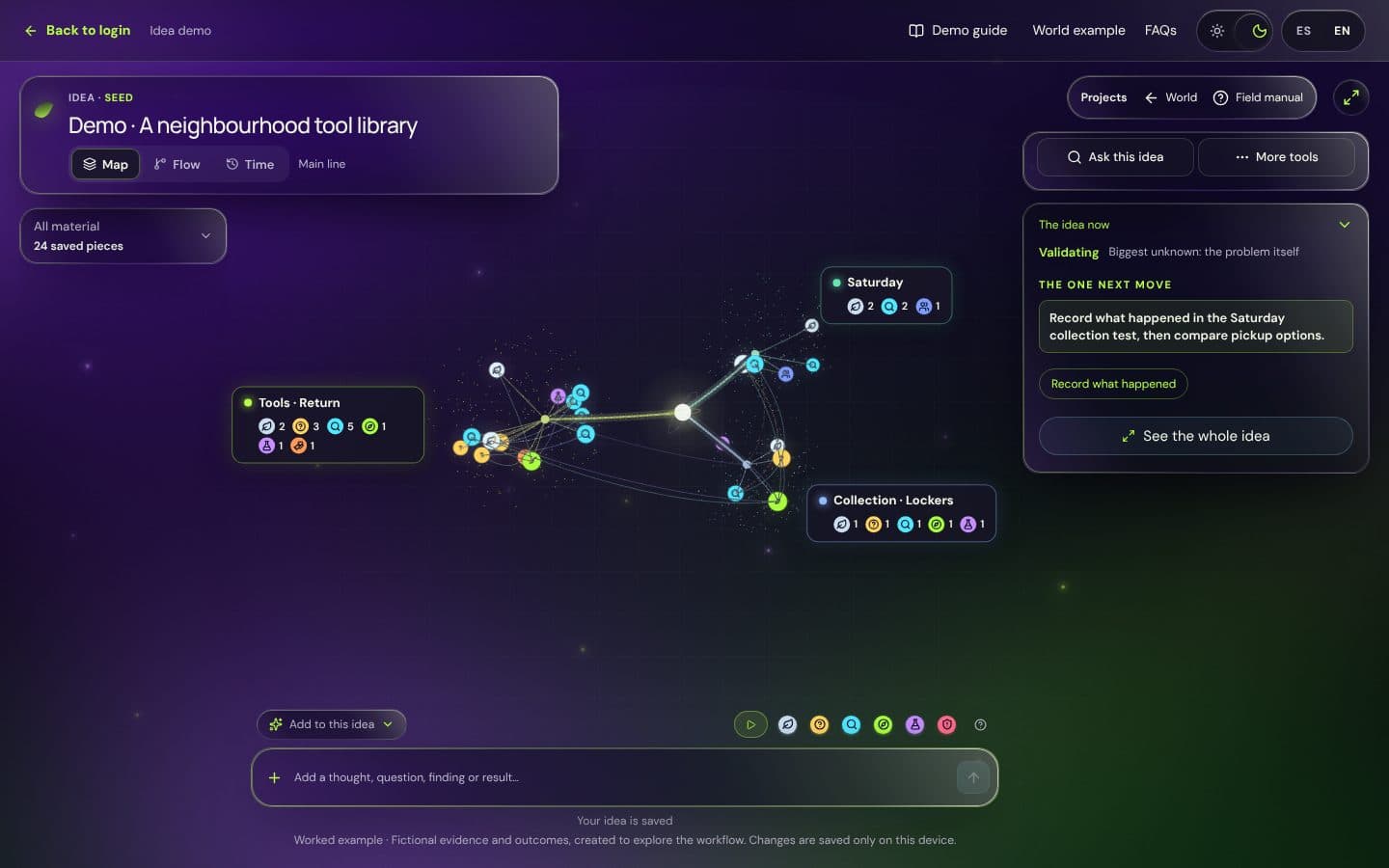
The limits are there on purpose: three active gardens with up to five ideas each, and a project at rest frees its place without losing its history. Everything is private by default; of a private idea, others only see its plant in the world, never the title or the content.
You can see how an idea is worked on in the example idea, or walk through an example world of projects, no account needed. And if you'd like to try it with your own project, the pilot is free: ask for a place below.
Frequently asked questions
Which app is best for managing projects with notes and documents?
If the project is already decided and needs executing, a task manager with attached documents or a wiki-style workspace. If you're still thinking it through, look for a tool that connects notes by what they mean, keeps the reason behind each decision and drafts documents from your reasoning.
Can I use Noemori alongside Trello, Asana or Notion?
Yes, and it's usually the most sensible combination: you think through and decide the idea in Noemori and, once there are clear tasks, you move them to your usual project manager. Noemori's documents can be downloaded and shared wherever you like.
How many projects should I have active at once?
Few. Lots of people work best with two or three truly active and the rest at rest, each with a summary for picking it up again. The exact number matters less than choosing it on purpose.
How do I keep project documents from going stale?
Make them come from the project's record, not the other way round. If each document cites the notes it's based on, you can regenerate it when something important changes instead of fixing it by hand.