You probably have ideas in your phone notes, in ChatGPT conversations, in screenshots, in a document you started three weeks ago and, above all, in your head. Every now and then you sit down to sort it out: a new app, some folders, things moved around. For a while it feels great.
The trouble is that the decision you'd been putting off is still there, same as before.
In this article we'll look at how to organize your ideas with one specific goal: deciding something. First, a method that works with pen and paper. Then, which kind of tool suits which way of working, and what to ask yourself before switching apps.
Organizing and deciding are different things
Almost every organization tool is very good at one problem: finding things later. That's what folders, tags, search and links are for. It's useful, of course, but it's rarely what holds you back when you don't know what to do.
What holds a decision back is hardly ever mess. It's usually one of these:
- The question isn't clear. You have lots of notes on the topic, but you couldn't say exactly what you need to decide.
- You mix what you know with what you assume. A hunch you noted months ago ends up looking like a fact.
- There's a contradiction you haven't noticed. Two notes point in opposite directions and nothing has warned you.
You can have everything perfectly organized and still be stuck.
What an idea needs before you can decide
Before deciding, it helps to have six things to hand:
- The question you're deciding, in one sentence.
- At least two real options, even if one is staying as you are.
- What you're taking for granted in each option.
- The places where your notes, your data or your wishes don't fit together.
- A criterion for choosing between the options.
- A small, concrete next step.
If one is missing, you know where to go next before collecting more information.
A five-step method (with pen and paper)
1. Write the question
At the very top, write what you're deciding. “The new project” won't do. Something like “Do I launch the course in January, or wait until I have more test students?” will.
With a well-written question, half your notes stop mattering, at least for now: the ones that don't help answer it can wait.
2. Dump everything, unsorted
For fifteen or twenty minutes, get out everything you have on that question: notes, loose sentences, data, worries, conversations. One idea per line, nothing sorted yet. If you work with AI, paste in whatever was useful from those conversations too.
3. Label each piece
Now you can mark each line with its type. These five are usually enough:
| Type | What it is | Example |
|---|---|---|
| Fact | Something you've checked | “12 people asked for the course by email” |
| Assumption | Something you believe but haven't checked | “People have more time in January” |
| Question | Something you don't know | “How long will each module take to record?” |
| Option | A possible path | “Launch a short version in January” |
| Risk | Something that could go wrong | “If I launch it half-done, I lose credibility” |
You'll usually find that almost everything is assumptions and questions, with very few facts. Knowing that already helps a lot.
4. Look for contradictions
Read the assumptions against each other and look for two that can't both be true. For example, “people have more time in January” and “my students tell me January is their busiest month at work”.
When you find one, don't push it aside. It's probably the most important thing on the page. Write down which question you'd need to answer to resolve it.
5. Decide with a criterion, and write it down
Choose the criterion before the option: “I launch in January if at least 8 of those 12 people confirm they can spend two hours a week on it”.
Then write down the decision, why you're taking it and what would make you revisit it. There's a full template in the article on how to turn your notes into decisions.
What your tool does to your attention
Before comparing tools, there's a question that hardly ever comes up in comparisons: how does the tool affect your concentration?
Researcher Gloria Mark has spent decades studying how we work at screens. In her book Attention Span (2023) she reports that, on average, we switch screens every few seconds (around 47), and that getting back into a task after an interruption can take much longer than that.
Thinking through a decision is exactly the kind of work that copes worst with those jumps. So when you look at tools, check this too:
- How much it shows you as soon as you open it: notifications, suggestions, tasks, what other people did.
- Whether the AI turns up when it wants or when you ask it to.
- Whether it helps you finish, or just gives you more to do.
A tool can either help you think or keep competing for your attention, and that shows far more in daily use than in a feature comparison.
Which kind of tool to use for what
| Kind | Examples | Very good at | Falls short at |
|---|---|---|---|
| Linked notes | Obsidian, Logseq | Storing and connecting notes freely | Warning you about contradictions or what's missing to decide |
| Documents and databases | Notion | Structuring information and sharing it with a team | Thinking through an open question: it's easy to end up designing the system instead of deciding |
| Infinite whiteboard | Miro, FigJam | Seeing everything at once and thinking as a group | Keeping track, over time, of why each thing was decided |
| Mind map | XMind, MindMeister | Unfolding a topic from the center | Separating facts from assumptions |
| Task board | Trello, Asana | Executing what's already decided | Everything that happens before the decision |
| Spreadsheet | Excel, Google Sheets | Comparing options with weighted criteria | Holding the context and doubts that don't fit in a cell |
Many of these tools now come with an AI assistant that helps you summarize or write. The thing to check is whether that AI helps you decide (for example, by flagging what doesn't fit) or simply helps you produce more text.
They're all good at what they do. The problem starts when you use an execution tool for a decision problem, or a storage tool for something you still need to think through.
Checklist for choosing a tool
Before moving to another app, score each question from 1 to 3:
- Can I start from a question, rather than a blank page or a structure?
- Does it distinguish in some way between what I know and what I assume?
- Does it warn me about contradictions or gaps, or does it just store what I write?
- Is there a record of why I decided what I decided?
- Can I try an alternative without breaking what I already have?
- Does it let me think without interrupting me? Can I silence notifications and suggestions?
- Does it help me stop, with a clear place to pick up again?
- Does it encourage me to keep few things open, or more and more?
If a tool scores under 16, it probably helps you store things, but not so much decide.
How Noemori does it
Noemori is designed for the part of the process other tools tend to leave out: going from having notes to making a decision.
You start with a question. Every note, document or conversation you bring (including ones you paste from ChatGPT or Claude) becomes a piece, and the living layer, which is Noemori's AI, places it on your idea's map next to what it supports or calls into question. When two pieces contradict each other it tells you, citing your notes, and you're the one who accepts or corrects. You can also read the whole idea at a glance: what you believe, what's still an assumption, what doesn't fit and which step comes next.
As for noise: you can set the living layer to Quiet and it stops proposing things on its own, though it still answers when you ask. Each account has three active gardens (each garden is a project) with up to five ideas each, and whatever doesn't belong to today is kept off the map, with no reminders. When you're done, “Enough for today” saves what changed and what's still open.
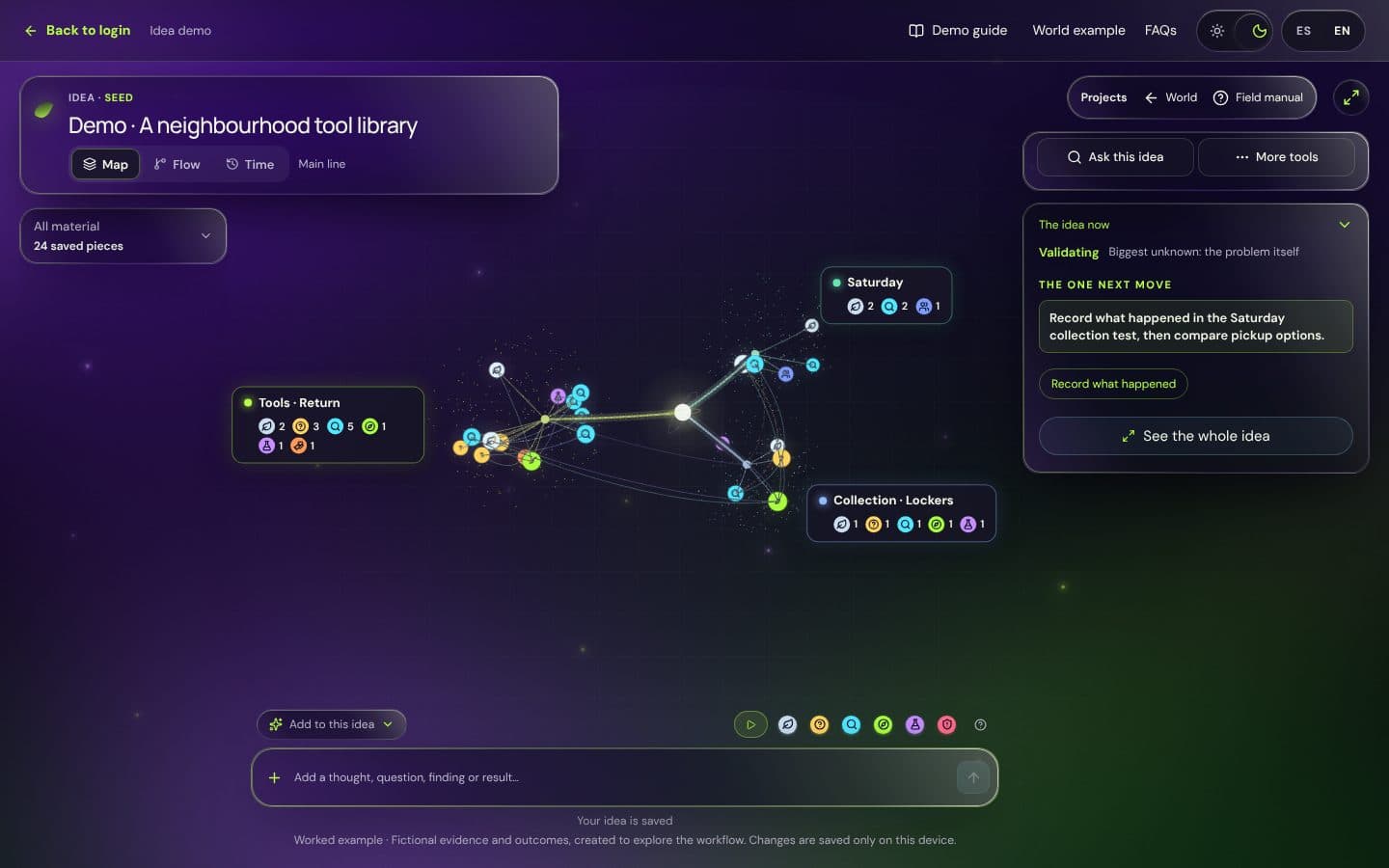
You can see it in the example idea with no account. If you'd like to try it with your own ideas, the pilot is free and you can ask for a place below.
Frequently asked questions
What's the best tool to organize ideas and make decisions?
It depends on what you want to do with them. To store and find things, linked notes work very well. To execute, a task board. To decide, you need something that separates facts from assumptions and shows you where they clash, whether that's a pen-and-paper method or a tool built for it.
Is a mind map useful for making decisions?
It's useful for exploring a topic and seeing its parts. For deciding it usually falls short, because it doesn't separate what's checked from what's assumed or record the criterion. You can combine it with steps 3 to 5 of this article.
How do I organize the ideas from my ChatGPT conversations?
Don't keep the whole conversation. Pick out the sentences that help, mark them as fact, assumption, question, option or risk, and treat them like any other note. And bear in mind that what a language model tells you is, at most, an assumption you still need to check.
How much time should I spend organizing before deciding?
Less than you'd think. If you've spent more than two sessions organizing and still haven't written the question or the criterion, you're most likely putting the decision off. Go back to step 1.